Convenient dental care delivered to your doorstep in Phoenix. Experience professional treatment without leaving your home.
Follow the step-by-step instructions below to easily add our site to your mobile device's home screen for quick access.
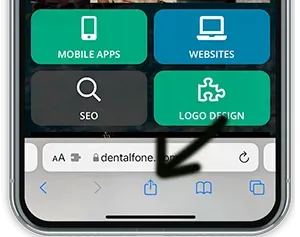
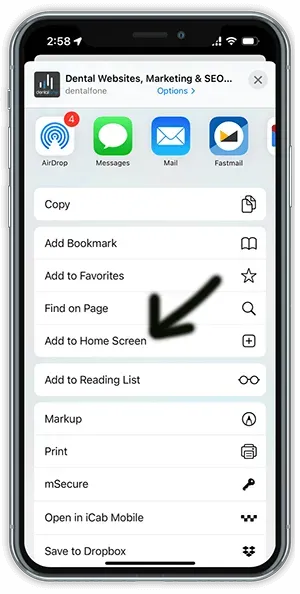
To add an icon to the home screen on your iPhone, iPod Touch or iPad when you’re looking at the home page of the app in Safari select the button shown below and scroll to and select “Add to Home Screen.” You must be using the Safari browser to view the app in order to see this option.
On Android it’s slightly more involved, depending on the browser being used:
Most new smartphones can scan QR Codes using the built-in Camera App. Just go to take a picture but don’t click the camera button, a pop-up should display when viewing the QR code through your phone that will allow you to click the link provided by the code. If your phone doesn’t support QR codes in the camera app, you can download a QR Code Scanner app from the appropriate app store for your phone.
BOOK YOUR VISIT
Join the Phoenix families who trust Hi-Fi Dental. New patients and emergencies are always welcome.